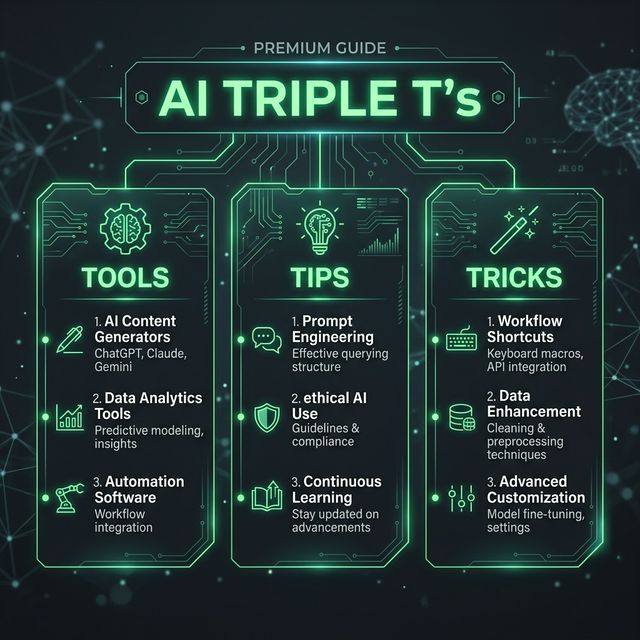
AI Triple T's: AI Music and Audio Production Tools, Tips & Tricks
The State of AI Music in 2026
The AI audio editing market is projected to grow from $1.55 billion in 2024 to $2.02 billion in 2025, increasing further to $5.68 billion in 2029 with a CAGR of 29.5%. What's driving this explosive growth? Creators are increasingly seeking fast, copyright-safe, and creative solutions. No longer a gimmick, AI audio tools are now mission-critical infrastructure for modern creators.
The Tools: 5 Essential AI Music & Audio Platforms
1. Suno – Full Song Generation with Natural Vocals
What it does: Suno is the best platform to create music with AI in 2026, featuring studio-quality audio, natural vocals, stem editing, and a full audio workstation that no other tool matches.
Why it stands out: Suno's primary advantage is its speed and the quality of its AI-generated vocals, making it perfect for creating demos, social media content, or testing lyrical concepts without hiring a vocalist. It is intuitive to pick up, but also deep enough for people who want to dig into stems, lyrics, and arrangements. The flexibility makes it feel both personal and sturdy.
Pricing: Suno operates on a credit-based system. A free plan offers a limited number of daily credits. Paid plans (Pro & Premier) provide more credits, general commercial use rights, priority generation, and access to newer features.
2. Udio – Studio-Polished Output with Stem Control
What it does: Udio specializes in generating high-quality, full-length songs from detailed text. The platform is designed with a clean interface that is approachable for beginners yet offers enough depth for seasoned professionals.
Why it stands out: Udio delivers radio-ready songs with clear structure and emotional depth, especially in pop and hip-hop. Fast rendering, editable lyrics, and commercial-safe licensing make it ideal for both producers and creators. You get timeline-style editing, an inpainting tool to fix specific sections of a track without starting over, and the ability to extend songs in 30-second increments. Stem downloads (vocals, drums, bass, instrumentals separately) are also on the table for paid users, which is a big deal if you want to actually do something with the output in a DAW.
Pro move: Users can select sections of a generated track to extend or regenerate, offering a more hands-on production loop. For a more professional sound, you can download your Udio-generated audio and import it into a DAW. Isolate the vocal stem and build a new foundation using a dedicated AI drum generator like Drumloop AI for punchier, custom-fit rhythms that elevate the track beyond a simple AI sketch.
3. SOUNDRAW – Legally Clear, Customizable Instrumentals
What it does: SOUNDRAW's catalog is 100% self-produced, which means no legal grey areas. You also get bar-level editing (mute, solo, intensity), genre-blending, and STEM exports—features most generators still lack.
Why it stands out: SOUNDRAW is one of the top professional and indie AI music tools for 2025. It's one of the only AI song generators that can generate custom beats and instrumental music—and many are recommending it for professional use. Pay monthly or annually and you can generate and download as many tracks (.mp3 only) as you want—there's literally no cap. Anything you make while you're subscribed stays licensed for life, even if you cancel later.
Real advantage: Zero legal ambiguity. No scraped songs, no legal gray areas – the AI is trained only on music created in-house. Because they control the entire catalog, you can create with confidence—no takedown notices, no hidden licenses, just limitless creativity.
4. LANDR Mastering Plugin – One-Click Professional Masters
What it does: LANDR is an AI-powered mastering tool that helps with control over stereo width, dynamics, and equalization. The Mastering Plugin guarantees high-quality results by enabling a seamless integration with digital audio workstations (DAWs).
Why it stands out: LANDR is optimal for LPs or EPs because it supports batch processing, which fosters a cohesive sound without additional charges for album mastering. Users can save and repurpose their settings across multiple projects, allowing you to have consistency and efficiency across styles and genres.
5. Stable Audio – Licensed Instrumentals for Content Creators
What it does: From the makers of Stable Diffusion comes Stable Audio, a text-to-audio generator focused on creating high-quality, structured instrumental music and sound effects. Unlike many tools geared toward full song generation with vocals, Stable Audio excels at producing commercially viable instrumental beds, background music for content, and specific sound effects, all from text prompts.
Why it stands out: Its primary strength is its coherent musical structure and a model trained on licensed data, making it a more reliable choice for creators concerned with usage rights. The platform is perfect for video producers needing a custom score, game developers generating soundscapes, or music producers looking for a foundational instrumental loop to build upon.
Pro Tips & Tricks: How to Use These Tools Like a Master
Tip 1: Craft Specific, Multi-Layered Prompts
The key to getting the most out of these tools is to be specific with your prompts. For example: Instead of "lo-fi beat," try "chill lo-fi beat with vinyl crackle, soft piano, and a rainy night vibe".
Why it matters: Generic prompts produce generic results. Detailed style tags and reference artists improve results. Suno & Udio allow emotional and structural prompts (verse, hook, bridge). The AI model is pattern-matching against millions of training examples—the more specific your signal, the better the output.
Action: When using Suno or Udio, include: (1) Genre + subgenre, (2) Emotional tone, (3) Specific instruments, (4) Structural hints ("starts with a 20-second intro"), (5) Reference artist or era if applicable.
Tip 2: Use Stem Separation & Remix Strategy
While Suno doesn't export MIDI directly, you can download the audio and drop it into your DAW. Then, build a custom drum track with a tool like Drumloop AI to replace the generated drums for more control. By understanding how to work with MIDI, you can effectively rebuild and customize AI-generated ideas.
Why it matters: AI-generated full tracks are starting points, not finished products. The magic happens when you deconstruct, isolate, and rebuild with your own production decisions.
Action: (1) Generate a full track in Suno or Udio. (2) Export stems if available (Udio allows this in paid tiers). (3) Import vocals or drums into your DAW. (4) Replace weak elements (often drums) with your own, or layer additional instruments. (5) Remix with confidence—you own the output.
Tip 3: Leverage Reference Audio & Style Transfer
Reference Audio is a standout feature for 2026. You can upload a snippet of an existing sound, and the AI will use it as a "style guide" to generate something entirely original but sonically similar.
Why it matters: If you've already nailed a vibe on one track and want to iterate, this saves enormous creative iteration time.
Action: (1) Generate a track you like in Tad AI or similar platform. (2) Use that as a reference for the next generation. (3) The AI will produce something new but musically aligned—same "DNA," different genes. Perfect for creating cohesive album sound or content series.
Actionable Use Cases: Try These Right Now
Use Case 1: YouTube Creator Producing 10 Videos This Week
The workflow:
- Access the AI Music Generator and enter your text prompt describing the desired music—mention genre, tempo, emotion, and primary instruments. For instance, "Ambient electronic track with soft synth pads and subtle percussion" produces a calm atmospheric score.
- Generate 3–5 variants using SOUNDRAW or Stable Audio (fast, 1–2 minutes each).
- Pick the best match for each video's mood.
- Download full stems or mix directly in the browser-based mixer to fine-tune tempo, key, and instrument layers.
- Done. Cost: ~$10/month. Time: 15 minutes. Quality: Professional.
Result: Small business owners can now produce high-end commercials without a five-figure production budget. Indie game developers can generate 8-minute ambient soundtracks that make their worlds feel immersive.
Use Case 2: Rapper/Singer Testing 5 Beat Ideas in One Hour
The workflow:
- Write your hook in ChatGPT, get 5 lyrical variations.
- Feed each variation to Suno with specific energy levels: "aggressive trap," "mellow conscious," "hype-energy trap," "introspective boom-bap," "melodic trap."
- Generate all 5 in parallel (~3 minutes total wait time).
- Tools like Suno allow you to upload audio clips, voice memos, or reference tracks. The AI can then build around your uploads.
- Pick your top 2. Download stems. Record your own vocal over the AI production in your DAW.
- Compare before finalizing.
Result: Iterate rapidly without waiting for producers. Ship something in 60 minutes that would have taken a week via traditional methods.
The One Critical Mindset Shift
In 2026, AI's role has expanded far beyond simple automation—it is now deeply creative, understanding context, artistic intention, and sonic texture. The result is an ecosystem of AI sound design tools that empower creators with professional-grade results from concept to production.
But here's the truth: AI-generated music serves better as a starting point or raw material that requires human refinement to achieve the emotional depth of traditional compositions. While incredibly useful for background music, backing tracks, and rapid prototyping, these tools work best when viewed as creative collaborators rather than replacements for human musical expression.
The Bottom Line
When you use these tools strategically, they remove technical friction and give musicians something more valuable than shortcuts: time. Whether you're producing 10 YouTube videos, testing beat ideas, or mastering your next single, the 2026 AI music stack eliminates the grunt work so you can focus on what actually matters: storytelling, arrangement, and emotional resonance.
Start with one tool. Master it. Then layer in others. The best creators in 2026 won't be those who dismiss AI—they'll be those who integrate it into their workflow with intention and craft.
Sources & References
- https://careerhub.students.duke.edu/blog/2026/02/06/top-ai-tools-for-music-production/
- https://suno.com/hub/best-ai-music-generator
- https://www.drumloopai.com/blog/ai-tools-for-music-production/
- https://www.companionlink.com/blog/2026/04/digital-creativity-in-2026-how-ai-audio-tools-are-empowering-the-modern-creator/
- https://www.soundverse.ai/blog/article/best-ai-music-producers
- https://www.mediaweek.com.au/best-ai-tools-for-musicians-in-2026/
- https://www.soundverse.ai/blog/article/spatial-audio-music-production-with-ai-tools-0811
- https://soundraw.io/
- https://blog.landr.com/ai-in-music/
- https://harro.com/2026/02/23/best-ai-tools-for-musicians-in-2026/
- https://dataforest.ai/blog/best-ai-tools-for-audio-editing
- https://www.it-jim.com/blog/ai-for-musicians/
- https://www.globenewswire.com/news-release/2026/01/29/3228442/28124/en/Artificial-Intelligence-AI-Audio-Editing-Research-Report-2025-5-68-Bn-Market-Opportunities-Trends-Competitive-Analysis-Strategies-and-Forecasts-2019-2024-2024-2029F-2034F.html
- https://www.rankmyai.com/rankings/use-audio-generation-overall
- https://www.soundverse.ai/blog/article/how-ai-is-used-in-audio-and-sound-design-0802
- https://www.soundguys.com/best-ai-music-generators-134781/
- https://www.audiocipher.com/post/ai-music-app
- https://www.digitalocean.com/resources/articles/ai-music-generators
- https://www.lummi.ai/blog/best-ai-music-generators
- https://www.soundverse.ai/blog/article/best-ai-music-generators-online
- https://soundraw.io/blog/post/top-10-ai-music-tools
- https://gemini.google/overview/music-generation/
- https://www.beatoven.ai/
- https://pitchinnovations.com/blog/top-ai-powered-sampling-for-music-production-2025/