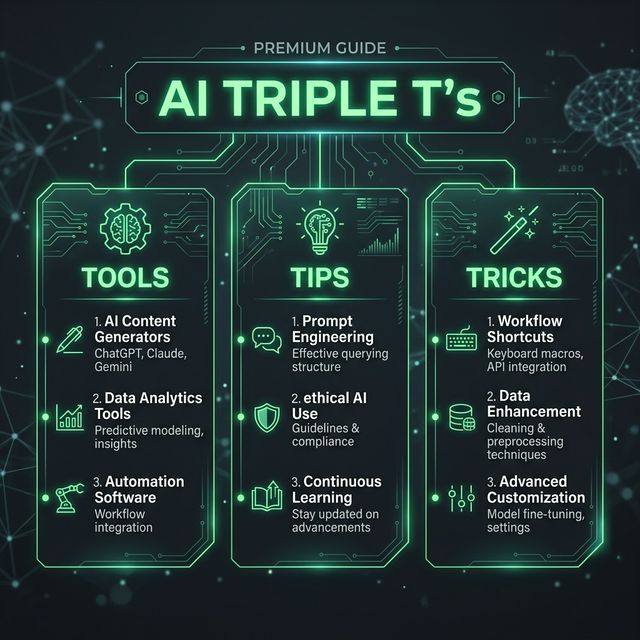
AI Triple T's: Claude & ChatGPT—Master These 2026 Powerhouses
The State of Play (March 2026)
ChatGPT, Gemini, and Claude are the best AI tools, but the real action is between the first two. ChatGPT remains the most widely used AI product in the world, generating nearly 2.7x more traffic than Gemini on the web. Yet Claude Code has risen to dominate tooling usage, going from zero to the #1 tool in only eight months after its May 2025 release.
The difference? ChatGPT is the generalist's playground. Claude is the specialist's weapon.
TOOLS: How They Actually Differ
ChatGPT 5.4 (with GPT-5 Thinking)
What it's built for: Everything and nothing in particular.
ChatGPT is the most well-rounded assistant on the market, capable of handling writing, brainstorming, document analysis, coding help, research, summarisation, and even multimodal tasks within a single interface. It's your first stop for any task you haven't done before.
When to default to it:
- Quick brainstorming sessions (5-15 minutes)
- Broad research across multiple domains
- Multimodal tasks (images, files, web searches simultaneously)
- Tone-light content and creative exploration
Claude 4.6 Opus
What it's built for: Thinking hard on complex problems.
Claude feels like the specialist you turn to when the work gets serious, especially useful for long-form writing, deeper reasoning, and handling more nuanced prompts. Claude 4.6 Opus now has a 1M context window with 128K output, enabling complex long-form tasks.
When to choose Claude:
- Deep analysis of lengthy documents (reports, theses, code repos)
- Complex reasoning and problem-solving
- High-stakes professional writing
- Nuanced content requiring consistent voice and tone
TIPS: 8 Use Cases That Separate Amateurs from Power Users
1. Claude for Document Archaeology
Don't use ChatGPT to summarize a 50-page report. Use Claude's 1M token window to load the entire thing at once, then ask follow-up questions with full context. Claude excels at nuanced writing tasks, long-form content, and complex analysis, handling context better than competitors and producing more natural-sounding text, making it ideal for content creators, researchers, and knowledge workers.
Tactic: Upload your document, ask for 3-5 key insights, then ask "What would challenge this conclusion?" Claude's reasoning catches counterarguments faster.
2. ChatGPT for Real-Time Research
Perplexity delivers fast, sourced answers, with growth in 2026 coming from replacing endless tabs for quick, reliable info. But ChatGPT with web search is still faster for most people.
Tactic: Use ChatGPT for "What's the latest on [topic]?" questions. Keep tabs closed. It'll cite sources.
3. Claude for Code Review at Scale
Anthropic's Opus and Sonnet models dominate coding tasks by a wide margin, with more mentions than all others combined. Claude Code released in May 2025 is already the most-used AI coding tool, overtaking GitHub Copilot and Cursor.
Tactic: Dump your entire codebase (API, frontend, utils) into Claude. Ask "What's the biggest security risk?" or "Where's the most fragile abstraction?" It catches what humans miss because of context fatigue.
4. ChatGPT for Quick Drafts, Claude for Iteration
ChatGPT can do everything the other tools can, but it can do everything with mediocrity. While it can read long whitepapers and share takeaways, it adds information from other sources, making its output inaccurate and hard to trust.
Tactic: Draft fast in ChatGPT. Refine in Claude. This two-step cuts your editing time by 40%.
5. Claude for Client-Facing Writing
Don't let ChatGPT's occasional hallucinations ruin your credibility. Perplexity AI combines search with AI to deliver sourced, real-time answers, citing sources for every claim, making it essential for researchers, students, and anyone who needs verified information. Similarly, Claude's reasoning model prioritizes accuracy over speed.
Tactic: For proposals, reports, or anything a client reads: use Claude. Every claim lands differently.
6. ChatGPT + Perplexity for Research Workflows
Don't use one for research. Use both. ChatGPT for synthesis, Perplexity for verification.
Tactic: Find data in Perplexity (it shows sources), then ask ChatGPT "Using these sources [paste], what's the narrative?" Perplexity + ChatGPT > either alone.
7. Claude for Meeting Notes → Strategy Docs
Granola is a notes-taking tool that listens to the entire meeting and summarises each point, organizing conversations into usable notes, action points, and clear summaries. But take that transcript to Claude.
Tactic: Feed Claude your meeting notes. Ask it to extract: (1) what was decided, (2) what's in progress, (3) what's unclear. Frame it: "Structure this as if I'm presenting to leadership." Claude reorganizes your brain.
8. ChatGPT for Multimodal Speed, Claude for Text Depth
Popular AI tools in 2026 are shifting toward specialized platforms – from text generators to autonomous systems – that handle complex reasoning and multimodal output. Tools are now designed to integrate into specific workflows.
Tactic: Use ChatGPT when you need images + text + analysis in one go. Use Claude when you only need text but it matters.
TRICKS: Stack Setup for Maximum Output
The Minimal Viable Stack
The best AI productivity stack for most professionals includes CraftNote for meetings, Claude for writing, and Perplexity for research. For teams, add Notion AI for document collaboration and Todoist for task management.
The Real Win: Tool Switching Rules
- Start with the question's complexity: Simple? ChatGPT. Complex? Claude.
- Stop mid-task switching: Pick one tool per task. Context switching kills speed.
- Combine, don't duplicate: Don't use ChatGPT + Claude on the same task. Use them sequentially (draft → refine).
Free Tier Reality Check
75% of new users start free before upgrading for speed/limits. Start with free tiers of ChatGPT, Gemini, or Perplexity for basics. Add one specialized tool based on your biggest time sink. Track what saves you hours – the real winners reveal themselves quickly.
The Prompt Structure That Works
For Claude:
[Context]
[Specific task]
[Constraints]
[Output format]
Example: "I'm writing a technical blog post (context). Explain how vector databases work (task). Assume readers know SQL but not AI (constraints). Use 3 sections with examples (format)."
For ChatGPT:
[Quick question]
[Tone/style]
[Optional constraints]
Example: "How do vector databases work? Keep it casual, 3 paragraphs."
The 2026 Reality: Specialization Wins
The best AI productivity tools in 2026 automate, personalize, and accelerate real outcomes. According to Gartner, AI agents will disrupt $58 billion in productivity software by 2027.
But here's what matters today: stop hunting for one perfect tool. Master two:
- Claude for work that needs depth and accuracy
- ChatGPT for speed and breadth
Used right, they're not competitors—they're a team. Claude thinks carefully. ChatGPT moves fast. Together, they do what neither can alone.
Start there. Everything else is optimization.
Bottom line for NodeFeeds readers: 95% of respondents use AI tools at least weekly, or more often, and 75% use AI for at least half their software engineering work. The question isn't "Should I use AI?" It's "Which tool for which problem?" Know the difference, and you'll work twice as fast.